
How to Structure a Presentation for Executive Influence
You've prepared the analysis. The slides look polished. The numbers are defensible. Then the meeting starts, and within minutes a senior stakeholder interrupts, asks for the recommendation, and your structure collapses.
That's the moment most professionals misdiagnose. They think the problem is nerves, accent, vocabulary, or slide design. In executive rooms, the bigger issue is usually message architecture. If your audience has to work to figure out where you're going, they'll stop giving you the benefit of the doubt.
For international professionals, this matters even more. When English isn't your first language, structure does part of the authority work for you. A clear sequence reduces pressure, sharpens your delivery, and helps you sound senior even when the conversation turns unexpectedly. If you want to understand how to structure a presentation for high-stakes meetings, start there.
Beyond Slides Your Structure Defines Your Authority
A weak presentation often fails before anyone comments on the data. It fails when the audience senses that the speaker is taking them on a tour instead of leading them to a decision.
Senior leaders rarely reward completeness for its own sake. They reward judgment. Structure is where that judgment becomes visible. A conclusion-led presentation signals that you understand business priorities, respect time, and know what matters most.
That's one reason executive presence is so tied to how you organize ideas. According to Sylvia Hewlett's Center for Talent Innovation study of 4,000 professionals, gravitas accounts for 67% of executive presence, communication 28%, and appearance 5% (executive presence findings). Those numbers matter because many professionals still overinvest in polish and underinvest in structure.
Structure communicates rank
When a director, VP, or C-level leader listens to you, they're not only evaluating your content. They're also judging whether you think like someone who can lead.
A scattered presentation suggests scattered thinking. A disciplined presentation suggests control.
Practical rule: If your audience has to wait too long to understand your point, your structure is weakening your authority.
This is why slide aesthetics come second. A clean deck helps. It doesn't rescue a poorly sequenced argument. One of the most useful ways to think about this is that your presentation must convey the message before it displays the evidence. That principle sits underneath strong executive communication and applies whether you're presenting a roadmap, risk update, budget request, or product recommendation. If you want a deeper breakdown of that distinction, this piece on how strong communication conveys the message is worth reading.
What strong structure does in the room
A well-built presentation changes how the room experiences you:
- It reduces listener effort. People can follow your argument without decoding it.
- It protects your authority under interruption. If someone jumps in early, you already gave them the main point.
- It lowers your language burden. Non-native speakers don't need elegant phrasing when the logic is clean.
- It makes your confidence believable. Calm delivery lands better when the sequence itself is stable.
The practical takeaway is simple. Your structure isn't packaging. It's proof of executive thinking.
Define Your Destination Before You Draw the Map
Most presentation problems begin before the first slide is drafted. The presenter opens PowerPoint, starts collecting facts, and builds the story in the same order they did the work. That instinct is understandable. It's also one of the fastest ways to lose senior attention.
The common failure is the chronological trap. Presenters walk through context, process, analysis, and only then arrive at the recommendation. According to guidance on executive presentations, presentations that start with background context risk executive disengagement within the first 3 minutes (chronological trap explanation).

Start with audience, not content
Before you decide what goes in the deck, answer two questions:
- Who is this audience really?
- What decision, reaction, or alignment do I need from them?
Those sound basic. In practice, they force better choices.
A CFO listening to a proposal usually filters for cost, risk, and timing. A product leader may care more about prioritization, dependency, and adoption. A country manager may focus on execution complexity. If you use the same structure for all three, you'll sound generic.
For non-native professionals, this audience step is especially useful because it shifts attention away from perfect wording and toward strategic framing. That's the move that makes your message sound more senior.
Define the single objective
Every presentation needs one destination. Not three. Not a broad hope that the audience will “understand the work.” One destination.
A strong objective sounds like this:
- Approve the proposed rollout sequence
- Align on the budget trade-off
- Decide whether to delay the launch
- Agree on the top operational risk
A weak objective sounds like this:
- Share updates
- Review findings
- Walk through the analysis
- Discuss the project
The first group drives action. The second group invites drift.
If you can't state the decision in one sentence, the presentation isn't ready.
A useful planning shortcut is to write the final ask before building the middle. That forces relevance. It also prevents the slide deck from becoming a storage unit for every interesting point you discovered.
Use a pre-build filter
Before you include a chart, example, or slide, test it against a simple filter:
| Question | Keep it if the answer is yes |
|---|---|
| Does this help the audience make the decision? | It directly supports the recommendation |
| Does this answer a likely objection? | It handles risk, timing, cost, or feasibility |
| Does this belong in the main flow? | It's essential now, not merely interesting |
If the answer is no, move it out of the core deck.
Teams often benefit from a reusable planning format before they ever open slides. These strategic framework examples are useful because they show how to turn broad thinking into a tighter executive message.
The point is simple. First choose the destination. Then build the map.
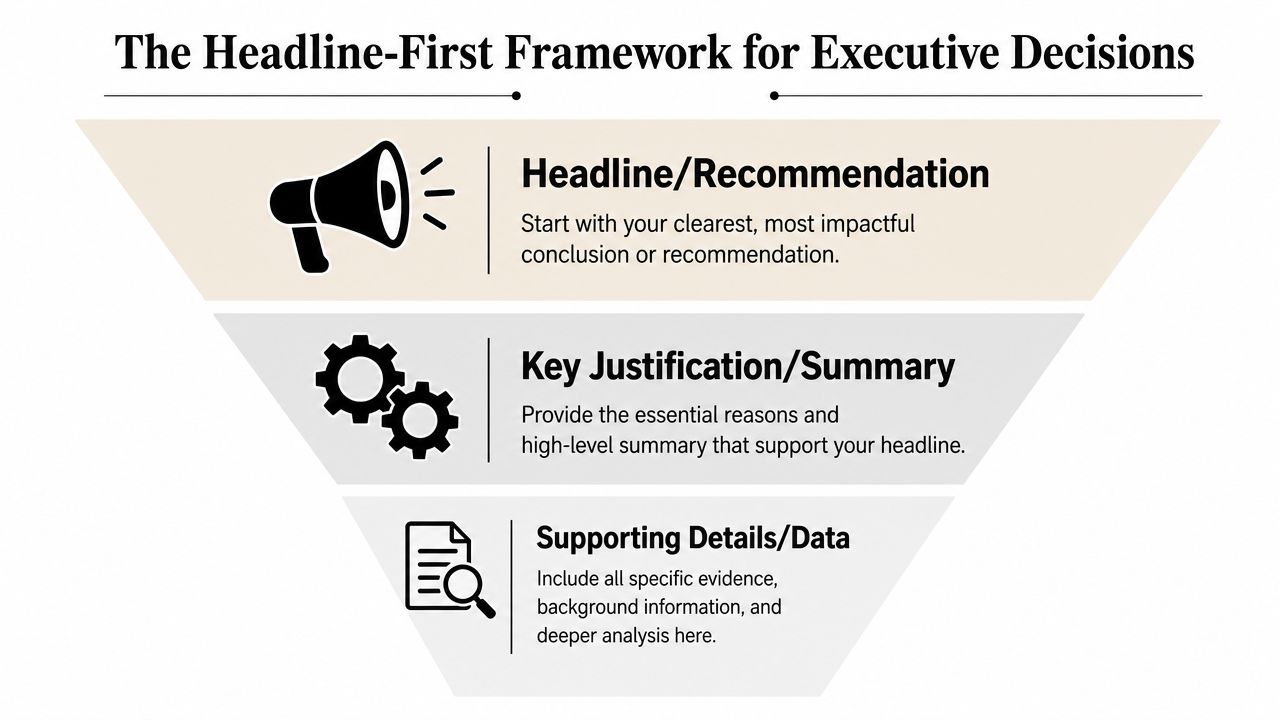
The Headline-First Framework for Executive Decisions
Senior leaders don't want a mystery. They want the answer, the reasoning, and the action required. That's why the most reliable structure for executive settings is the headline-first model.
According to guidance on executive presentations, the most effective step-by-step methodology is the inverted pyramid or headline-first approach, which leads with the recommendation or conclusion and follows a four-phase architecture: (1) Title & Objective, (2) Executive Summary, (3) Key Insights with 1 to 3 slides, and (4) Recommended Action (headline-first architecture).
A simple visual helps fix that model in your head.
Phase one and two
The first two phases are where authority is won or lost.
Title and objective
Your opening slide should tell the room what this meeting is for. Not the broad topic. The purpose.
Compare these two titles:
- Q3 Retention Analysis
- Decision Needed on Q3 Retention Recovery Plan
The first announces content. The second announces business intent.
The objective line should be equally direct. One sentence is enough. State what you want the audience to decide, approve, align on, or challenge.
Executive summary
The executive summary is the shortest useful version of your case. One sentence. Sometimes two. It answers, “What are you recommending, and why now?”
Examples:
- We should delay the release until the dependency risk is resolved because the current path increases operational exposure.
- We should prioritize onboarding improvements first because the current friction is limiting adoption.
That sentence does heavy lifting. It gives the audience a frame before they see the details.
Phase three
Most professionals overload the deck here. Don't.
The guidance above limits this section to 1 to 3 slides. That constraint is useful because it forces prioritization. Your job isn't to show everything you know. Your job is to show the few points that make the decision credible.
Use the Rule of Three in spirit here. Build your case around three supporting arguments at most. More points often make the message feel less decisive, not more persuasive.
A practical way to shape these slides:
- Insight one: What's happening now that matters to the business
- Insight two: Why it's happening, or what risk/opportunity it creates
- Insight three: Why your recommendation is the most sensible next move
Each slide should carry one idea linked to a business outcome such as revenue, cost, or risk. If a slide mixes diagnosis, methodology, and recommendation, split it.
The audience should be able to summarize your argument after hearing the titles alone.
If you need help creating that backbone before opening PowerPoint, this PowerPoint presentation outline guide offers a practical planning sequence that many professionals find easier than drafting slides too early.
Here's a quick comparison:
| Weak executive flow | Strong executive flow |
|---|---|
| Background first | Conclusion first |
| Process narrative | Decision narrative |
| Many equal points | Few prioritized points |
| “Any questions?” ending | Clear action request |
Phase four
The last phase is the ask. Many otherwise solid presentations fade here because the presenter ends with information instead of direction.
Your final slide should answer three things:
- What decision is needed
- What happens next
- How success will be judged
That last piece matters. It makes your recommendation feel operational, not theoretical.
This is also where delivery matters. State the recommendation cleanly. Then stop. Let the sentence land before you begin defending it. If you regularly present upward, it helps to study how senior conversations work outside the deck itself. This guide on how to talk to senior leadership is useful because it focuses on the judgment signals leaders listen for.
A short video can help you visualize the logic in action.
Telling a Story Within Your Structure
Logic gets attention. Story creates memory.
That doesn't mean turning a business presentation into a theatrical performance. It means arranging the material so the audience feels movement. They need to sense where things stand, what tension exists, and what resolution you're offering.
Use a business version of three acts
The cleanest storytelling overlay for executive presentations is this:
- Setup. What is the current situation?
- Confrontation. What problem, friction, or risk makes action necessary?
- Resolution. What decision or recommendation changes the outcome?
This works especially well with headline-first structure because the recommendation comes early, but the supporting slides still need internal momentum. Otherwise the presentation feels like a list.
Take a common scenario. A product manager presents to a leadership team about declining activation.
The setup is not a company history or a tour of the dashboard. It's the current business reality. Users are entering the product but not reaching the value moment quickly enough.
The confrontation is the operational or commercial consequence. Slow activation affects adoption, creates friction for downstream teams, and raises pressure on acquisition to compensate.
The resolution is the recommendation. Simplify onboarding, remove a specific point of friction, and sequence rollout in a way leadership can support.
Good executive storytelling doesn't make the audience admire the presenter. It helps the audience see the path from problem to decision.
Make the audience the hero
One mistake professionals make is centering themselves in the story. They describe what they analyzed, what they discovered, and how hard the project was.
That's rarely persuasive in senior rooms.
A stronger approach frames the audience as the actor who can change the outcome. Leadership is deciding whether to reduce the risk. The board is deciding whether to back the plan. The client is deciding whether to move.
That shift matters for non-native speakers because it reduces the pressure to perform charisma. You don't need to sound dramatic. You need to make the stakes legible.
If you want another structured way to think about business narrative, explore this Storyloft story framework. It's a useful planning tool when your message feels technically correct but emotionally flat.
Keep the narrative underneath the slides
Story is not an excuse to become vague. It should sit beneath the content, not replace it.
A useful pattern sounds like this:
- Here's the current state.
- Here's where the pressure is building.
- Here's the decision that resolves it.
That sequence works in live presentations, board updates, investor conversations, and internal proposals. It also maps well to speechwriting discipline. If you want to sharpen how you phrase that movement, this guide on writing a speech offers practical help for making spoken structure sound more natural.
Scripting and Signposting for Global Leaders
For many international professionals, the hardest part of a presentation isn't the analysis. It's controlling the flow in spoken English while staying authoritative.
That's where signposting helps. Signposting means using explicit verbal markers to tell the audience where you are, what matters now, and where you're going next. It sounds simple because it is. That simplicity is exactly why it works.
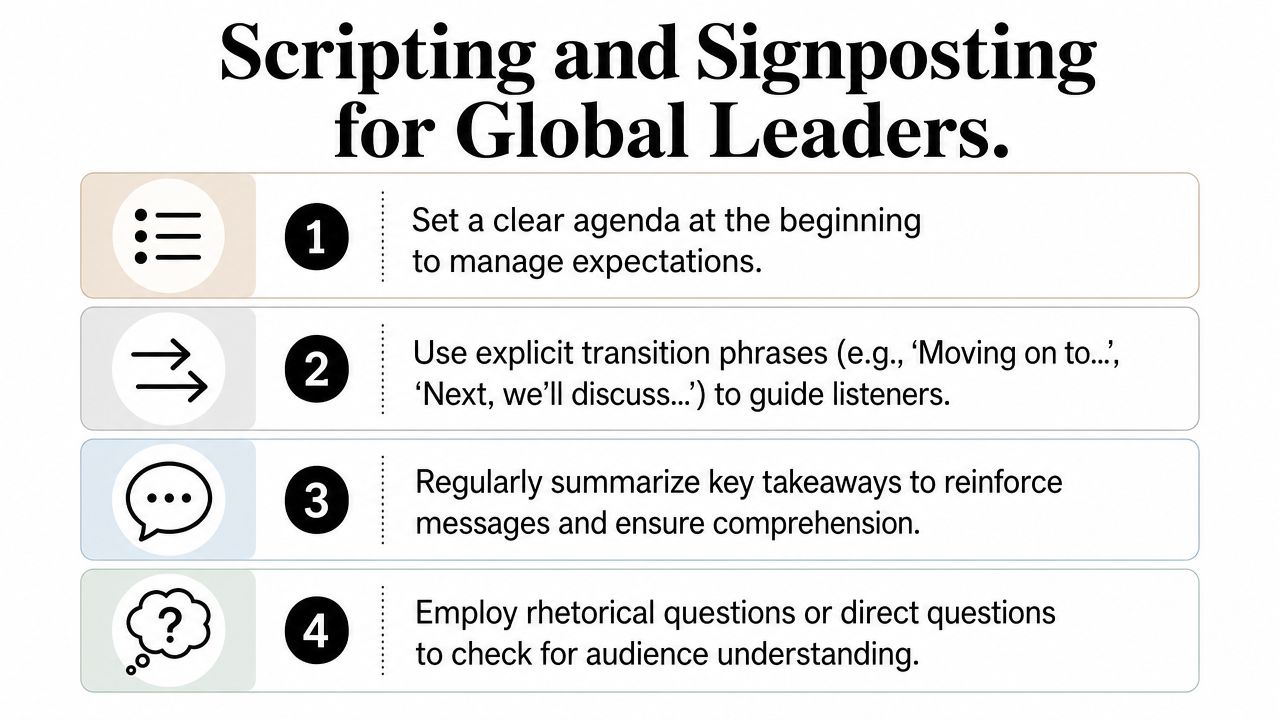
Signposting language that sounds senior
Many non-native speakers avoid direct language because they want to sound polite. The result is often too much buildup, too many qualifiers, and transitions that disappear.
Use shorter phrases instead:
- Opening the presentation: The decision I'm recommending today is…
- Framing the logic: There are three reasons this matters.
- Moving forward: I'll start with the business impact.
- Shifting slides: The next point is the operational risk.
- Summarizing: The key takeaway is…
- Closing: My recommendation is to proceed with option B.
These phrases do two jobs. They guide the audience, and they buy you time to think. That second benefit is underrated. Under pressure, clear signposts act like rails. They help you stay composed even if your exact wording changes.
Use the power pause
Research on executive presence confirms that the power pause, a deliberate silence before or after a key point, helps leaders control flow and give words greater weight (power pause guidance).
Most professionals speak through their strongest lines. They rush the recommendation, continue immediately into explanation, and weaken the impact.
Try this pattern instead:
- State the point.
- Pause.
- Let the audience process it.
- Continue with the evidence.
Example:
“We should delay the launch by two weeks.”
Pause.
“The dependency risk is still unresolved, and the current timeline transfers that risk into operations.”
That pause does not make you sound uncertain. It makes you sound in control.
Silence is part of the sentence when you want to sound authoritative.
Build a script you can flex
The best script is not one you memorize word for word. It's one you can re-enter from anywhere.
Create scripts at three levels:
- Full message level. Your recommendation in one sentence.
- Section level. A short phrase for each main block.
- Transition level. The exact signposts you'll use aloud.
That gives you structure without sounding rehearsed. It also protects you when someone interrupts.
For professionals who want deeper work on this, The Gravitas Method is a 12-week one-on-one executive presence coaching program for international professionals who want to communicate with more authority and influence at senior levels. The program is priced at $8,200 paid in full or $9,000 across three installments. Coached by Nikola, it covers vocal authority, strategic framing, executive body language, and high-stakes communication.
Mastering Rehearsal and High-Stakes Q&A
A presentation isn't finished when the last slide ends. In executive settings, the critical test often begins when the questions start.
That's where many polished presenters lose credibility. They can deliver the prepared flow, but once a stakeholder challenges a data point or changes the frame, their language becomes defensive and their structure disappears.
Research on presentation structure for global professionals notes that high-stakes executive settings demand rapid adaptation when skepticism or data challenges emerge mid-presentation, and that standard templates often fail in those moments for non-native speakers (pressure restructuring challenge).
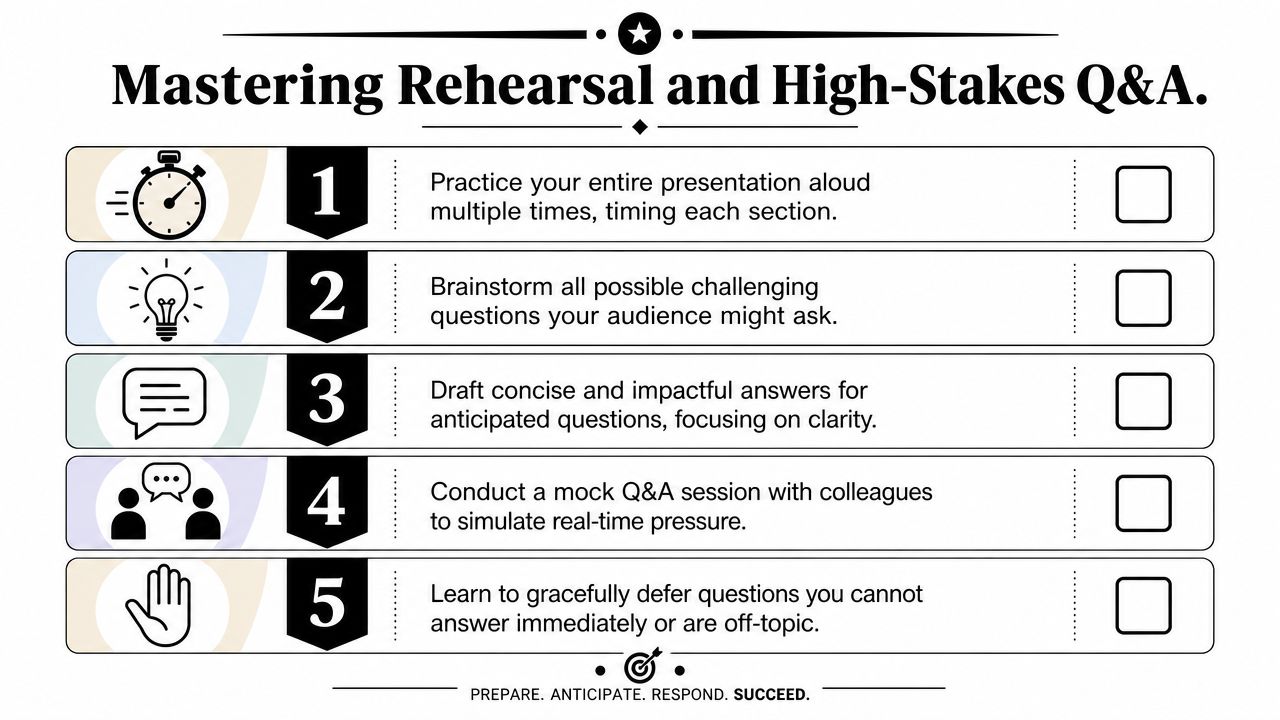
Rehearse for flexibility, not recitation
If you memorize full sentences, interruption feels like a derailment. If you rehearse the logic, interruption becomes manageable.
A better rehearsal method:
- Practice the opening cold. You should be able to state the recommendation without warming up.
- Rehearse from slide titles only. This tests whether the structure is strong enough without scripts.
- Answer hostile questions aloud. Not in your head. Spoken pressure is different.
- Prepare backup material. Keep detailed support in an appendix, not in the main narrative.
That appendix matters because it lets you respond with evidence without cluttering the core deck. In executive rooms, visible restraint often reads as confidence.
A simple method for difficult questions
When a senior stakeholder challenges your point, don't answer with a long defense. Restructure first.
Use this sequence:
- Acknowledge the question
- Reframe the decision issue
- Answer directly
- Support with one relevant fact or rationale
- Return to the recommendation
Example:
“That's the key concern. The decision is whether speed is worth the current operational risk. My view is no. The unresolved dependency makes the current timeline fragile, so I recommend a short delay.”
This pattern is especially effective for international professionals because it prevents rambling. It also keeps your authority anchored in decision logic instead of language perfection.
A useful supplementary resource is this guide for busy executives on presentations, which is practical for tightening delivery when your schedule doesn't allow endless preparation.
Know how to defer without sounding weak
You won't always have the answer immediately. That's normal. What matters is how you handle it.
Use language like:
- I don't want to speculate on that point.
- I can confirm the detail after this meeting.
- That question sits outside today's decision, but I'm happy to follow up.
- The broader conclusion still holds, and I can provide the underlying detail separately.
That last move is critical. Don't let a side question steal the structure of the whole presentation.
If staying on track under pressure is difficult, this guide on changing the topic gracefully is useful because it teaches how to redirect without sounding evasive.
If you want a serious read on how your communication lands in senior rooms, start with the free Executive Communication Assessment from Intonetic. It's the best entry point if you're ready to strengthen how you structure ideas, speak under pressure, and project authority in critical situations.