Body Language on Camera: An Executive’s Guide to Authority
You know the feeling. You've prepared the deck, clarified the recommendation, and anticipated every objection. Then the video call starts, you speak for five minutes, and the room stays flat. No visible resistance, but no real traction either.
For many senior international professionals, that gap isn't about expertise. It's about body language on camera. I've seen leaders with strong judgment undermine themselves by looking smaller, tighter, and less certain on screen than they do in person. The problem gets worse when English isn't your first language. You work harder to choose the right words, and that mental load starts showing up physically.
The good news is that on-camera authority is trainable. Small adjustments in framing, posture, eye contact, and gestures can change how your message lands in high-stakes meetings.
Why Your Message Gets Lost on Video Calls
You join a leadership call with a clear recommendation, solid numbers, and answers ready. Within minutes, you can feel yourself monitoring your English, checking whether you sound precise enough, and trying not to interrupt anyone. Then your body starts doing its own version of that effort. Your shoulders tighten, your face goes still, and your hands disappear.
I see this often with senior international professionals. The issue is rarely lack of expertise. The issue is that language anxiety changes visible behavior, and on camera that behavior gets read as hesitation, caution, or lower status.
This is the non-native speaker body language paradox. The more carefully you try to control your wording, the more physical restraint shows up on screen. Your audience may register that restraint before they fully process your point. On a video call, small cues carry more weight because the frame is narrow and people are studying your face at close range.
The camera amplifies self-monitoring
In person, people get your full presence. They can read movement, timing, and how you hold the room. On video, they get a cropped version of you. That makes minor signs of tension look more meaningful than they are.
A lowered chin can read as defensiveness. Looking at your own thumbnail instead of the camera can read as uncertainty. Holding your breath before a key sentence can flatten your voice and weaken the point.
My clients find this frustrating because the meeting often feels fine internally. They know what they mean. They are following the discussion. Yet their audience sees a speaker who looks guarded. That gap is where good messages lose force.
Practical rule: If your message sounds strong in rehearsal but gets less traction live, check what your body is signaling while you speak and while you wait to speak.
Overthinking also shows up physically. It affects your breathing, face, and pacing long before you notice it. If that pattern feels familiar, this guide on how to stop overthinking and worrying is a useful companion because less mental strain usually leads to a calmer visible presence.
What authority looks like on camera
The goal is not to perform confidence. It is to remove the physical habits that make competence harder to see.
| Habit | What it signals on camera |
|---|---|
| Upright posture, open chest, visible hands | Readiness and authority |
| Chin tucked, shoulders rolled forward | Caution, self-protection |
| Stillness before speaking | Seniority and control |
| Fidgeting while waiting for your turn | Nervous energy |
For international professionals, speech and body language are closely linked. If you are spending too much attention on pronunciation, pace, or finding the exact phrase, your body often tightens in response. That is why I often pair presence coaching with work on how to speak English more clearly on video calls and presentations. Clearer delivery reduces visible strain. Then your authority reads the way it should.
Your Technical Foundation for Executive Presence
Before anyone evaluates your ideas, they evaluate the picture. That isn't superficial. It's how human beings process credibility on video. A poor setup makes you work twice as hard for the same level of authority.
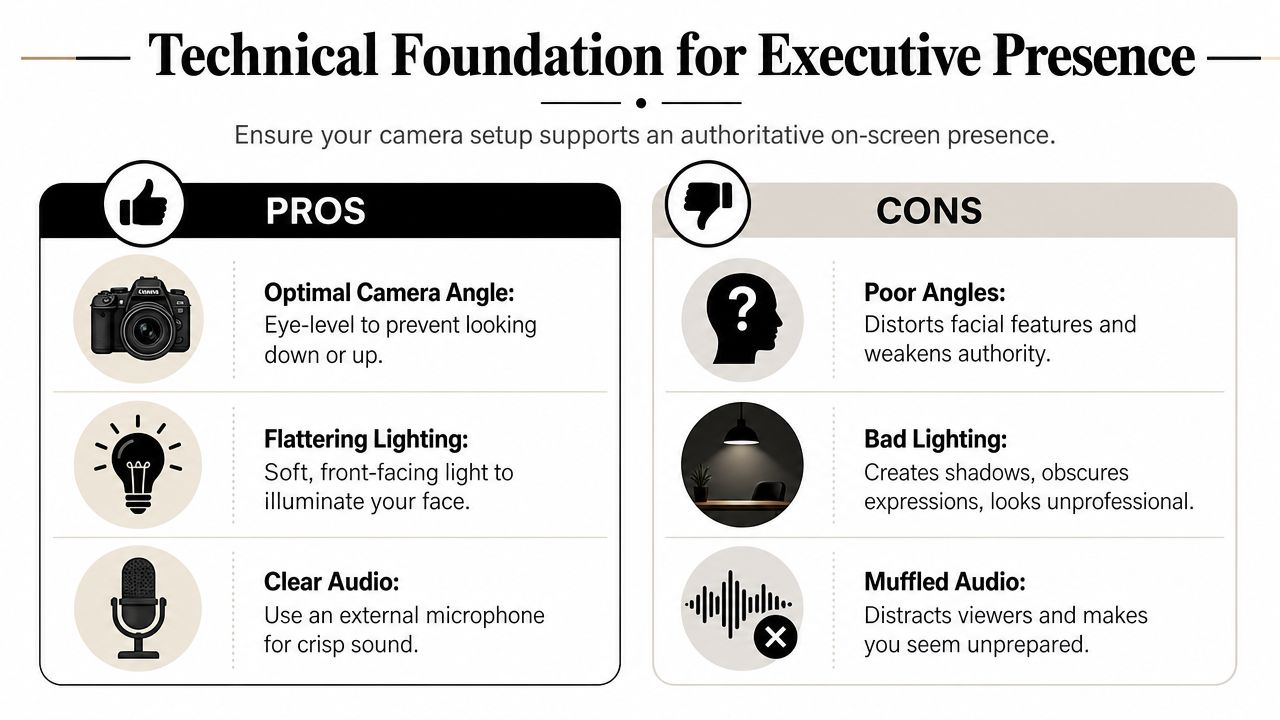
Expert analysis identifies posture, eye contact, and hand gestures as the three fundamentals that cover 90% of what makes someone look authoritative on camera, and it also notes that camera angle is decisive. Eye level or slightly above is preferred, while a low camera angle distorts the face and reads as casual or unserious (expert body language guidance for video).
Fix the angle first
If your laptop is sitting low on a desk, raise it. Use a laptop stand, a stack of books, or an external webcam. This one change often improves perceived authority immediately.
What works:
- Eye-level camera: It creates a natural perspective.
- Slightly above eye level: Often flattering and still professional.
- Stable device placement: No wobble, no improvised balancing that shifts mid-call.
What doesn't:
- Camera below your chin: It can make you look passive or careless.
- Leaning down into the frame: It compresses your neck and changes your expression.
- Holding a phone by hand: It introduces movement and inconsistency.
Frame yourself like a leader, not a bystander
The strongest frame for executive calls is usually chest-up. It gives enough room for facial expression and some hand movement without making you look distant. It also prevents the “floating head” effect that can feel oddly intense.
Use this quick setup checklist:
- Center your body, not just your face. If your head is off to one side, the frame can feel accidental.
- Place your eyes near the top horizontal line of a 3×3 grid. That composition tends to look balanced and intentional.
- Leave room for gestures. If the crop is too tight, your hands vanish and your delivery loses force.
You don't need a studio. You need a frame that stops distracting from your authority.
Light and sound carry status
People forgive ordinary backgrounds more easily than they forgive bad light and muddy audio. If your face is dark, your expressions disappear. If your voice sounds hollow, you seem less prepared than you are.
A practical setup:
- Front-facing light: Sit facing a window if possible.
- Soft artificial light: A basic light placed behind the camera works well when daylight isn't available.
- External microphone: Even a simple clip-on mic usually sounds more deliberate than built-in laptop audio.
I recommend treating your setup as part of your executive toolkit. The same way you wouldn't walk into a board meeting with a wrinkled shirt and a dying pen, don't enter a critical call with a camera angle that weakens your presence. If you want a practical walkthrough, this guide on how to set up conference call details the essentials.
Projecting Authority Through Posture and Stance
International professionals often fall into a pattern I see constantly in coaching. They know they're senior enough for the room, but the moment the camera turns on, their body starts negotiating on their behalf. The chin drops. The shoulders narrow. The elbows lock in. They become visually cautious.

That pattern has a name. The non-native speaker body language paradox describes how international professionals often adopt closed, defensive postures on video because of anxiety about language, even though executive presence requires openness. Supporting material from 2024 also points to maximizing ear-to-shoulder distance as a marker of confidence, while hunching reduces that distance and signals anxiety instead of authority (discussion of the non-native speaker body language paradox).
Stop shrinking in the frame
The first goal isn't to look powerful. It's to stop looking guarded.
That means:
- Lift the sternum slightly. Not exaggerated. Just enough to open the chest.
- Lengthen the back of the neck. This helps your chin stay level instead of tucked.
- Let the shoulders rest wider. Not pinned back. Just no forward collapse.
- Unstick the arms from the torso. A bit of space reads as ease.
Many people overcorrect. They try to “sit like a CEO” and end up rigid. That doesn't work either. Rigid posture looks rehearsed and fragile. The goal is relaxed command.
Use the ear-to-shoulder cue
I often give clients one visual instruction instead of ten mechanical ones: create more space between your ears and shoulders. That cue tends to solve several problems at once.
When that space disappears, you usually see:
- hunching
- neck tension
- a compressed jawline
- a worried expression
When that space returns, the speaker looks calmer and more grounded.
Here's a quick comparison:
| Posture pattern | Likely audience read |
|---|---|
| Open chest, level chin, relaxed shoulders | Composed and credible |
| Chin down, shoulders raised, arms pinned | Defensive or uncertain |
| Leaning slightly forward with stability | Engaged |
| Constant shifting in chair | Unsettled |
If you're worried about your English, your body will try to hide you. Don't let it.
Build a sustainable meeting posture
For long meetings, heroic posture won't last. You need something repeatable.
Try this pre-call sequence:
- Sit toward the front half of the chair.
- Place both feet on the floor.
- Exhale fully once.
- Let the shoulders widen.
- Check that your hands can enter the frame naturally.
I've seen this change the tone of a leader's presence before they say a single word. Not because it makes them look dominant, but because it removes the visual signs of apology.
If this is an area you want to train more deliberately, body language for leaders is worth reviewing alongside your own recorded calls.
Building Trust with Strategic Eye Contact
Many assume they're making eye contact on video when watching faces on the screen. That feels natural to you, but to the other person it often looks like your gaze is slightly off. The result is subtle disconnection.
In virtual client interactions, activating the camera significantly increases win rates by 94%, and the same guidance notes that eye contact works best in short bursts of 3 to 5 seconds into the lens while making a point, followed by a shift back to the screen. It also warns that continuous staring into the lens reduces trust (body language in video calls).
Use the lens as a person
The camera lens is not equipment during a high-stakes meeting. It is the listener's eyes. Treating it that way changes your delivery immediately.
My clients find this easier when they stop trying to “perform eye contact” and instead attach lens contact to emphasis. When you deliver the sentence that matters most, look into the lens. Then return to the screen to read reactions.
That rhythm feels natural because it mirrors in-person speaking. You don't stare at someone nonstop in a conference room. You connect, break, reconnect.
The short-burst method
This is the method I coach most often because it works without looking artificial.
Try this pattern:
- Look at the lens when you state your recommendation.
- Hold for 3 to 5 seconds.
- Shift back to the screen while others respond.
- Return to the lens for your next key point.
This works especially well in:
- Executive updates: Use lens contact for headline messages.
- Stakeholder alignment calls: Use it when clarifying decisions.
- Interviews or promotion panels: Use it when answering the core question.
Watch for this mistake: Staring into the lens the entire time can feel intense. Good eye contact builds trust. Unbroken eye contact can create pressure.
Add listening cues without overdoing them
Eye contact isn't only for speaking. Your face and head movements matter when others talk.
Useful signals:
- A small nod: It shows you're following.
- A slight head tilt: It can convey interest.
- A still face with soft focus: Better than exaggerated reactions.
What to avoid:
- rapid nodding
- darting eyes between windows
- checking notes while someone else is speaking unless you explain it
If you want to refine this skill further, I recommend studying the art of eye contact. For many international leaders, this is the fastest visible upgrade in body language on camera because it changes trust, connection, and authority at the same time.
Using Gestures to Emphasize and Persuade
A senior leader joins a global client call, knows the material, and speaks in clear English. Yet the delivery still feels tight. The hands disappear below the desk, then rush into frame at the wrong moment. I've seen this often with international professionals. Language anxiety does not stay in the voice alone. It shows up in the body, and on camera that can reduce perceived authority even when the content is strong.
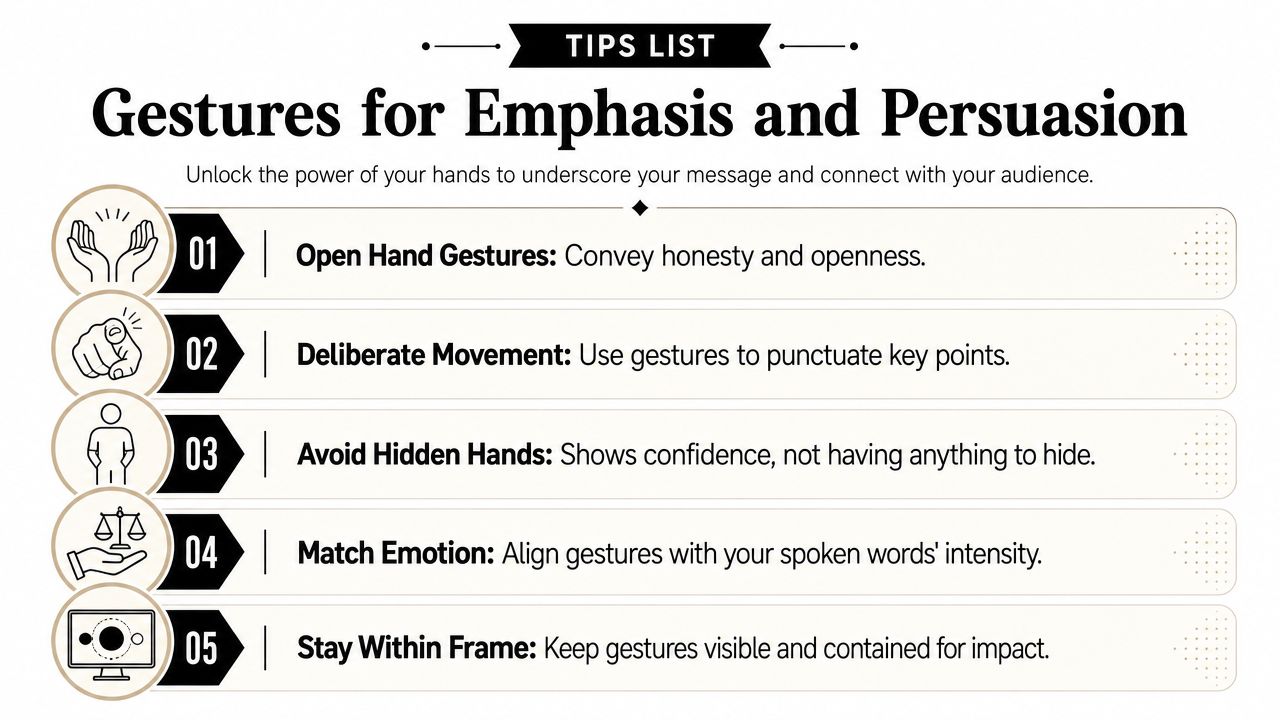
Gestures give your message shape. They help the listener track emphasis, contrast, sequence, and conviction. On video, where the frame removes part of your physical presence, your hands do more of that work.
Keep your hands available, not hidden
Hands that never appear can make you look guarded or overly scripted. Hands that never settle make you look unsettled. The goal is visible, calm readiness.
Good default placement:
- around chest to waist level
- inside the frame
- relaxed between gestures
Poor default placement:
- in your lap
- under the desk
- clasped tightly at the midline
- touching your face repeatedly
This is a camera setup issue as much as a delivery issue. If your frame cuts off every natural hand movement, you will either suppress gestures or force them. My clients find that a chest-up frame with a little more space below the sternum gives them room to speak with authority without performing for the camera.
Match the gesture to the message
Use gestures where they clarify meaning. Senior professionals do not need more movement. They need cleaner movement.
Examples:
- Enumerating points: Raise one finger, then two, then three as you move through a sequence.
- Showing contrast: Use one hand for option A and the other for option B.
- Indicating scale: Move your hands closer together or farther apart.
- Signaling openness: Use open palms when discussing transparency or collaboration.
For international speakers, this matters even more. If you are concentrating on vocabulary, sentence structure, or accent, your body can become either rigid or overactive. That is the non-native speaker body language paradox. The harder you try to sound precise, the more physically constrained you can appear. Purposeful gestures solve part of that problem because they give the body a job. Instead of managing nerves, you are marking meaning.
This video offers a useful visual reference for hand use and delivery on camera:
What persuasive gestures look like on screen
A few patterns read consistently well in executive settings:
- Open palms: They support candor and reduce perceived defensiveness.
- Contained movement: Deliberate beats carry more weight than constant motion.
- Gesture on keywords: Save movement for the words that carry the decision, risk, recommendation, or result.
- Stillness after emphasis: A brief pause lets the point register.
What weakens your message:
- finger-pointing at the camera
- chopping the air on every sentence
- touching hair, glasses, or face repeatedly
- clasping hands so tightly that the knuckles whiten
Your hands should support your message, not compete with it.
One practical standard works well. Gesture once for each main idea, then return to stillness. That rhythm reads as controlled and persuasive on screen.
If you want to strengthen this further, study how gesture supports executive presence in presentations. For many international leaders, this is the point where delivery starts to feel natural again. You stop monitoring every word and start leading the room.
Your Action Plan for Commanding the Camera
Executive presence on video isn't built through one perfect meeting. It's built through repetition, review, and adjustment. Leaders who train these habits create stronger trust. That matters because McKinsey research demonstrates that leaders who master body language improve team trust by up to 40%, which gives nonverbal delivery clear business value in senior settings (discussion of body language and leadership trust).
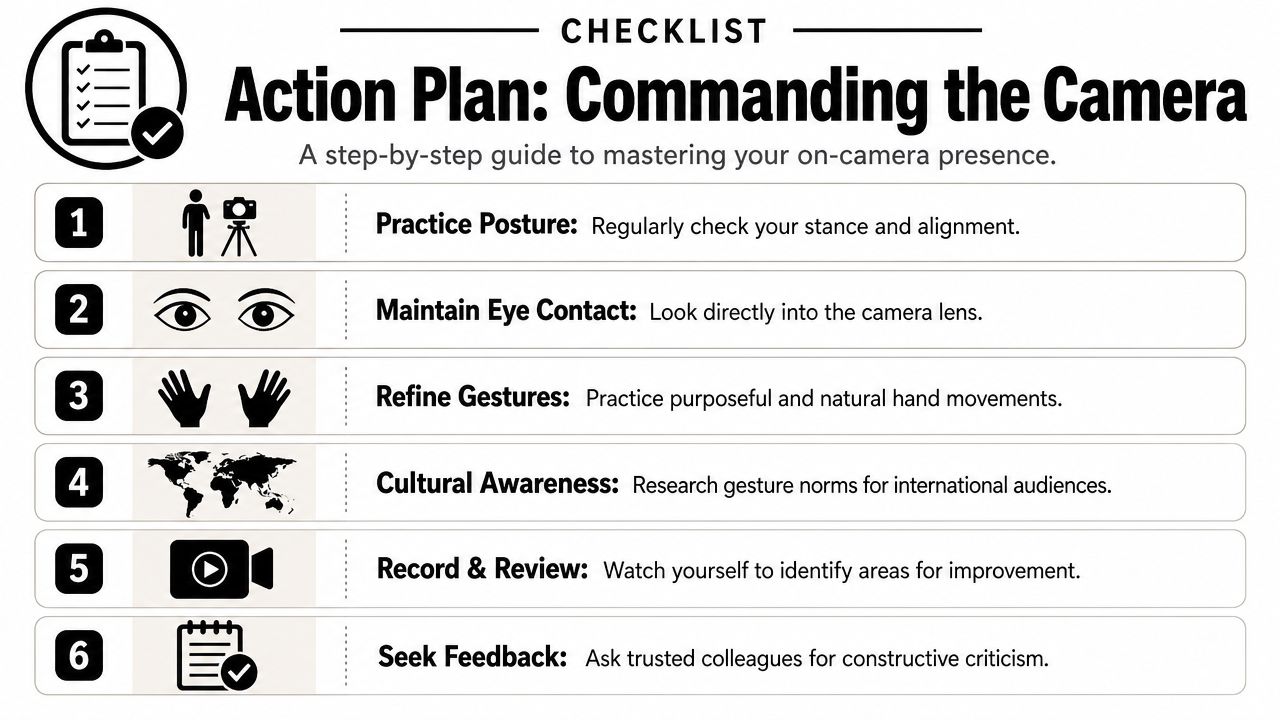
Use a repeatable pre-call checklist
Before important meetings, run this sequence:
- Check framing. Confirm eye-level camera and chest-up composition.
- Reset posture. Open the chest and release the shoulders.
- Test lens contact. Say your opening line once while looking into the camera.
- Prepare your hands. Keep them available for emphasis, not hidden.
- Simplify the background. Remove visual clutter if possible.
- Review one recording. Even a short playback exposes habits quickly.
This doesn't need to take long. The value is consistency. Senior presence comes from repeatable signals.
Adapt for international rooms
Cultural fluency matters here. Some gestures that feel normal in one market can read too forceful, too casual, or too familiar in another. That doesn't mean you should become stiff. It means you should aim for gestures and expressions that are broadly legible to a global audience.
Safer choices include:
- open palms
- measured nods
- contained movement
- a calm, attentive face while listening
Less reliable choices include:
- pointing
- expansive gestures close to the camera
- highly animated reactions in formal settings
Practice in short loops
My clients improve faster when they stop doing vague “practice” and start doing focused reps.
Use these drills:
- One-minute posture drill: Record yourself delivering one point, then review only your shoulders, chin, and chest.
- Lens-contact drill: Record three versions of the same answer and use lens contact only on the key sentence.
- Gesture drill: Explain a recommendation with three numbered points and make each point visible with your hands.
If you want a structured presentation framework to support those drills, your executive presence presentation is a useful place to start.
For professionals who want deeper support, The Gravitas Method is a 12-week one-on-one executive presence coaching program for international professionals who want to communicate with more authority and influence at senior levels. The program is priced at $8,200 paid in full or $9,000 across three installments. Coached by Nikola, it covers vocal authority, strategic framing, executive body language, and high-stakes communication.
The ultimate shift happens when these choices stop being techniques and start becoming your default. That's when your expertise finally looks as senior as it already is.
If you want a clear view of what's weakening your authority on video, start with Intonetic's free Executive Communication Assessment. It's the best first step if you want specific feedback on your delivery, executive presence, and how you come across in high-stakes meetings.