Influencing Skills Training PPT: A Step-by-Step Guide
Most advice on an influencing skills training ppt gets the sequence wrong. It starts with models, acronyms, and polished slides. That's the easy part. The hard part is building a deck that changes how people handle resistance, align stakeholders, and speak with credibility when they don't control the room.
A useful deck isn't a miniature textbook. It's a facilitation tool. It helps people diagnose how they currently influence, test better approaches, and get feedback while the stakes are still low. That matters even more with senior international audiences, where people often know the theory already but struggle to apply it in fast meetings, cross-functional tension, and high-stakes English communication.
The strongest decks I've seen are practical, spare, and slightly uncomfortable in the right way. They ask participants to practice. They surface habits. They leave room for feedback. They also respect the reality that many participants are influencing across functions, cultures, and time zones, often in a language that isn't their first.
Setting the Stage Before You Open PowerPoint
If you're building an influencing skills training ppt, the first question isn't what slides to include. It's what business problem the training needs to solve.
Influence gets treated like a soft skill until a project stalls, a cross-functional decision drags, or a senior stakeholder disengages. That's why many organizations position it as business-critical. One employee competency guide notes that 87% of organizational changes fail when leaders rely on authority rather than influence and frames influence as a measurable capability tied to outcomes like leading cross-functional work without formal authority and influencing upward on significant decisions (Rework influencing skills competency guide).
That single point should change how you design the deck. You're not building “communication training.” You're building a tool for reducing execution risk.
Define behavior, not broad ambition
Most decks fail because their objectives are vague. “Improve influencing skills” isn't an objective. It's a category.
A useful objective sounds like this:
- Stakeholder alignment: Participants can tailor one message for a skeptical peer, a busy executive, and a cautious cross-functional partner.
- Decision movement: Participants can ask for a concrete next step instead of ending with discussion.
- Upward influence: Participants can frame a recommendation in terms of business impact, trade-offs, and timing.
- Meeting presence: Participants can speak concisely under pressure without over-explaining.
These are observable. They can be practiced. They can also be tracked using the kinds of concrete measures the competency guide highlights, such as success rate, stakeholder reach, speed to agreement, and relationship quality.
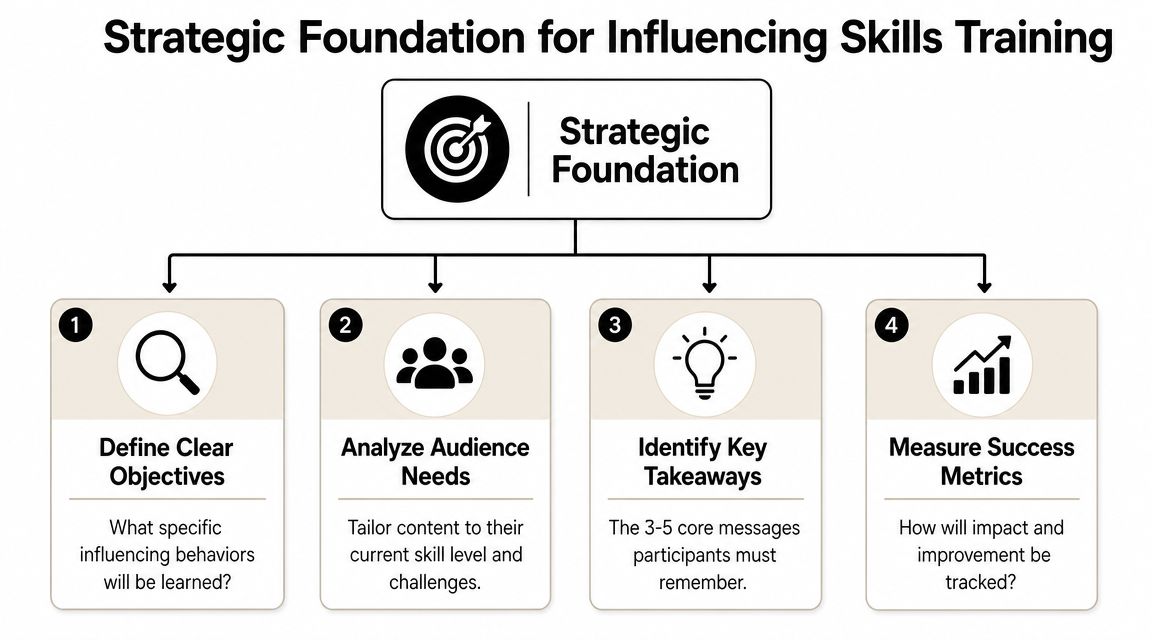
Diagnose the audience before you draft content
A senior global audience rarely has one influence problem. Finance leaders may need sharper executive framing. Product teams may need more stakeholder empathy. Technical experts may have strong logic but weak pacing, weak ask, or language that sounds too detailed for executive rooms.
Before building the deck, gather answers to a few questions:
| Audience factor | What to find out | Why it matters |
|---|---|---|
| Seniority | Are they managers, directors, or executive-track leaders? | Senior groups need less theory and more strategic application |
| Context | Do they influence peers, clients, or executives most often? | The scenarios should match their pressure points |
| Language profile | Are many participants non-native English speakers? | You'll need simpler phrasing, slower activity pacing, and cleaner examples |
| Delivery setting | In person, hybrid, or remote? | This affects activity design and slide density |
If you're also thinking about the broader system around the workshop, this guide to optimizing L&D training delivery is a useful complement because the delivery method shapes what your deck can realistically achieve.
Practical rule: If the audience can't see themselves in the first ten minutes, they'll treat the rest of the deck as generic leadership training.
For participants who work in English as an additional language, I also build in extra time for spoken practice and vocal clarity. Short articulation drills before roleplay can help people sound more deliberate under pressure. A simple prep routine like these vocal warm-ups and tongue twisters can make the practice portion noticeably more effective.
A Slide-by-Slide Blueprint for Your Training Deck
Blank-slide paralysis usually comes from trying to cram everything into one deck. Don't. A strong influencing skills training ppt follows a progression. It gives people a frame, then a language, then a chance to use both.
Ohio State University's influencing material recommends a staged capability-building approach: diagnose default style, identify gaps and a development plan, role-play the pitch, then start in low-stakes situations before moving to higher-stakes ones (Ohio State influencing others PPT). That sequence works because it mirrors how skill typically develops.
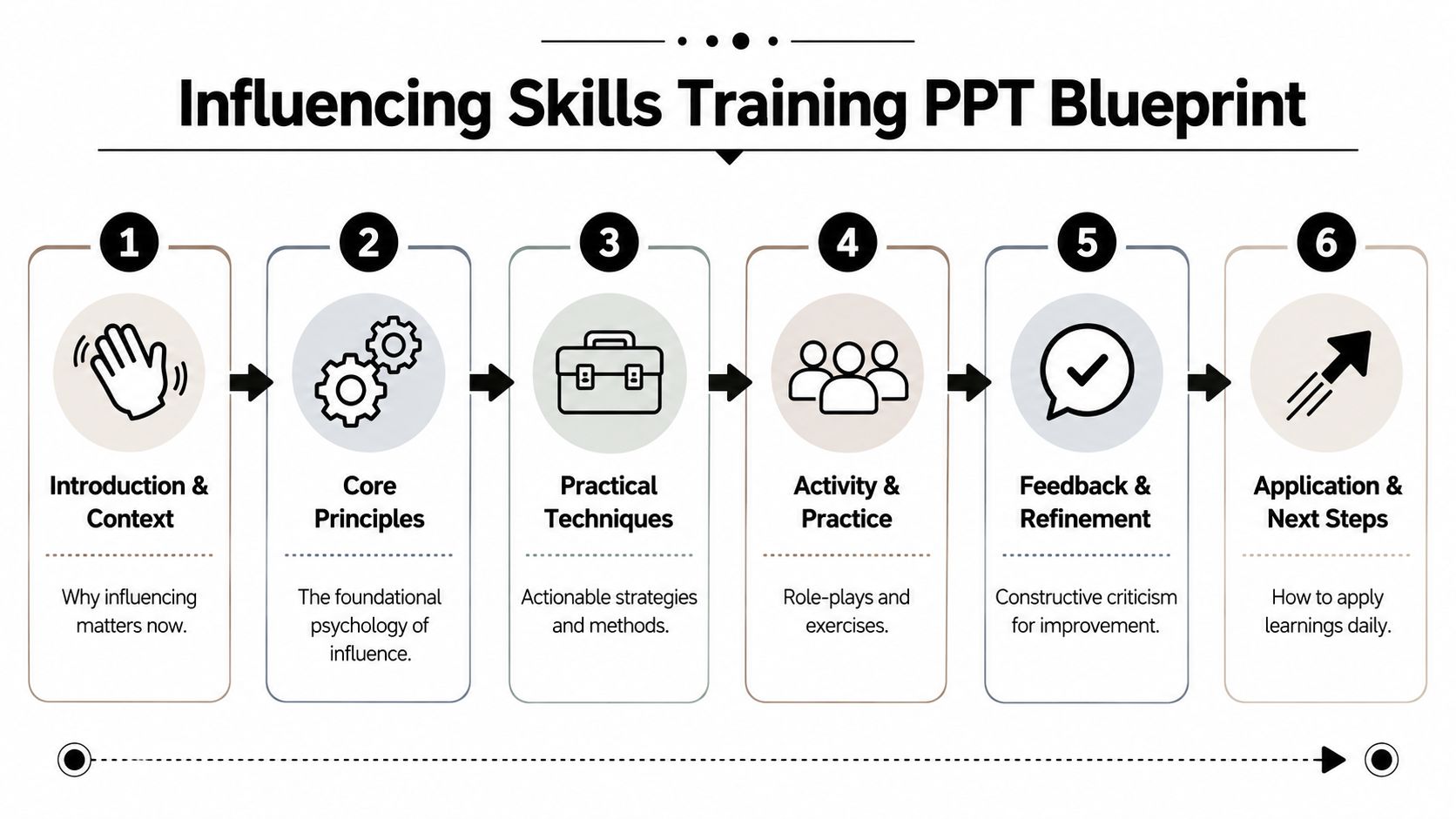
Slides 1 to 3 for relevance and credibility
Open with tension, not definition. Senior audiences don't need a dictionary entry for influence. They need proof that the session understands their world.
Use these first slides to establish three things:
- Why influence matters in their role now
- Where influence breaks down
- What they'll be able to do differently by the end
A strong opening sequence might look like this:
- Slide 1: “When expertise isn't enough”
- Slide 2: “Where stakeholder buy-in usually breaks”
- Slide 3: “Three influence moves you'll practice today”
Keep the visuals simple. One idea per slide. One clean headline. Minimal body text.
Slides 4 to 8 for core models people can remember
Many decks go off course when trainers add too many frameworks. Participants leave with notes, not usable habits.
Keep it tight. One or two models are enough. If you include more, application quality drops because people spend the session sorting frameworks instead of practicing judgment.
A solid middle section can include:
| Slide | Purpose | What to include |
|---|---|---|
| 4 | Define the distinction | Influence as long-term effect without force, versus short-term persuasion |
| 5 | Stakeholder lens | What this person wants, fears, protects, and needs to hear |
| 6 | Tactic selection | Logical appeal versus relational approach depending on context |
| 7 | Message structure | Situation, recommendation, rationale, ask |
| 8 | Risk check | Common mistakes such as over-explaining, pushing too hard, or sounding vague |
The best model is the one participants can still use in a difficult meeting two weeks later.
For non-native English-speaking professionals, this section should also reduce linguistic load. I often rewrite model labels into shorter, more speakable language. “Executive framing” lands better than “high-order strategic narrative architecture.” So does “clear ask” over “call-to-action optimization.”
If spoken delivery is part of the challenge, it's worth pairing the deck with practical support on clarity and rhythm. This guide on improving English pronunciation for public speaking is especially relevant for participants whose ideas are strong but whose delivery sounds less decisive than they intend.
Slides 9 to 15 for scenarios, not theory
This part should dominate the deck. Influence is contextual, so abstract advice won't stick unless participants apply it to realistic tension.
Use scenarios like:
- A product manager needs engineering support without formal authority.
- A senior specialist needs to challenge a director's plan without sounding oppositional.
- A regional leader needs alignment from colleagues with different cultural norms around disagreement.
- A technical expert needs to give a concise recommendation to an executive who wants the answer fast.
Give each scenario a structure. Context. Stakeholder goal. Hidden resistance. Time pressure. Then ask participants to build their message.
Slides 16 to 20 for practice and transfer
These final slides aren't content slides. They are facilitation slides.
Use them to prompt:
- individual reflection
- paired roleplay
- peer feedback
- a low-stakes real-world commitment
A good closing slide doesn't say “thank you.” It says, “What conversation will you test this in by Friday?” That pushes the training out of the room and into actual behavior.
Designing Activities and Roleplays That Build Real Skills
A lecture deck can create recognition. It won't create capability.
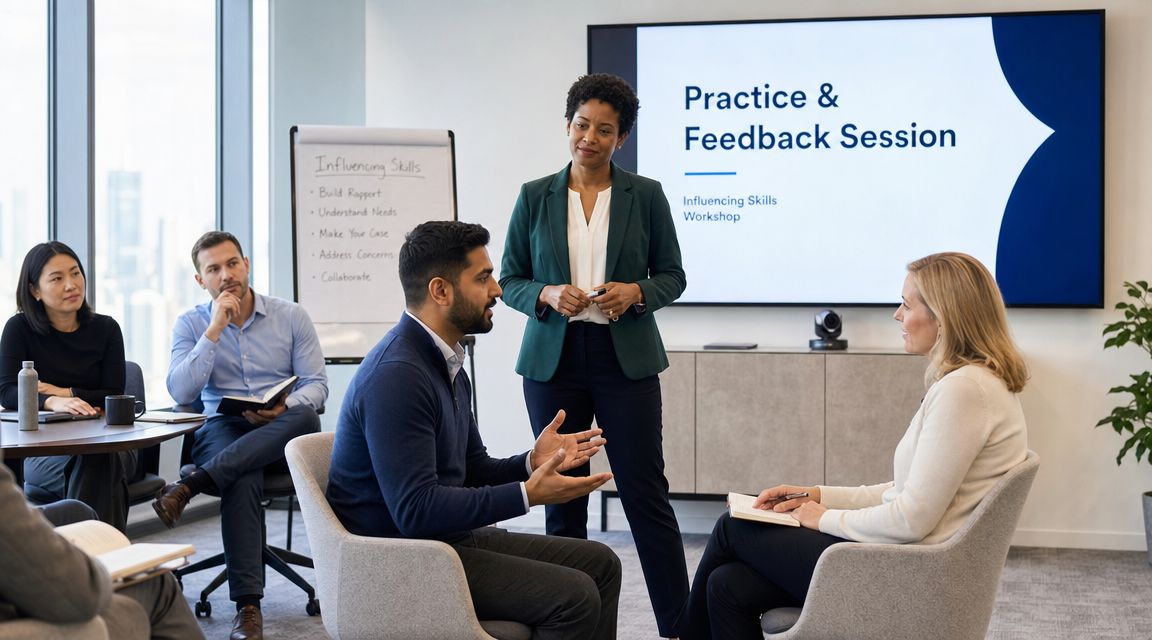
High-impact training depends on psychological safety, live practice, and feedback loops. Dale Carnegie's High Impact Presentations course uses a small-group format with coached practice and in-the-moment correction, and it warns against relying too heavily on content-rich slides without rehearsal because that limits transfer to real settings (Dale Carnegie High Impact Presentations).
Build safety before you ask for performance
Senior professionals often resist roleplay for predictable reasons. They don't want to look clumsy in front of peers. International professionals often carry an extra burden because they're not only testing influence tactics but also speaking in a second language under observation.
That means your activity design has to lower threat without lowering standards.
Use this progression:
- Start privately: Ask participants to write a real influence challenge before they speak.
- Move to pairs: Let them rehearse with one partner first, not in front of the full room.
- Use narrow prompts: Don't say “influence the stakeholder.” Say “open the conversation in 30 seconds” or “make the ask in one sentence.”
- Debrief behavior, not personality: Comment on structure, clarity, and response to resistance.
Use exercises with a clear output
Open discussion rarely produces skill growth. Structured exercises do.
Three formats work especially well:
| Exercise | Output | Why it works |
|---|---|---|
| Stakeholder map | One-page influence plan | Forces participants to think beyond their own agenda |
| Message rewrite | Short before-and-after script | Makes vague language visible |
| Resistance roleplay | Live response to pushback | Trains adaptability under pressure |
One of the most useful roleplays is “skeptical peer, limited time.” Give the speaker one minute to explain a proposal to a colleague who is busy, unconvinced, and mildly defensive. That setup surfaces common habits fast: too much context, weak asks, defensive tone, and failure to connect with the other person's priorities.
Here's a useful example of training footage to calibrate what active practice can look like in a workshop setting.
“Don't ask participants to perform the whole conversation first. Ask them to practice one move well.”
Adapt roleplay for non-native English speakers
A common issue is that many decks exclude part of the room. If participants are operating in English but thinking in another language, long and improvisational roleplays can overwhelm them before the influence skill even gets tested.
Make these adjustments:
- Pre-load useful phrases: Give sentence stems such as “My recommendation is…” or “The trade-off is…”
- Allow preparation time: Silence before speaking improves quality.
- Score fewer variables: Don't assess tone, logic, brevity, and body language all at once.
- Use replay: Let them try the same exchange again after feedback.
For teams that need more support in spoken realism, these role-playing and simulation exercises to improve English accent can help facilitators make practice more accessible without turning the session into language training.
Visual Design for a Global and Remote Audience
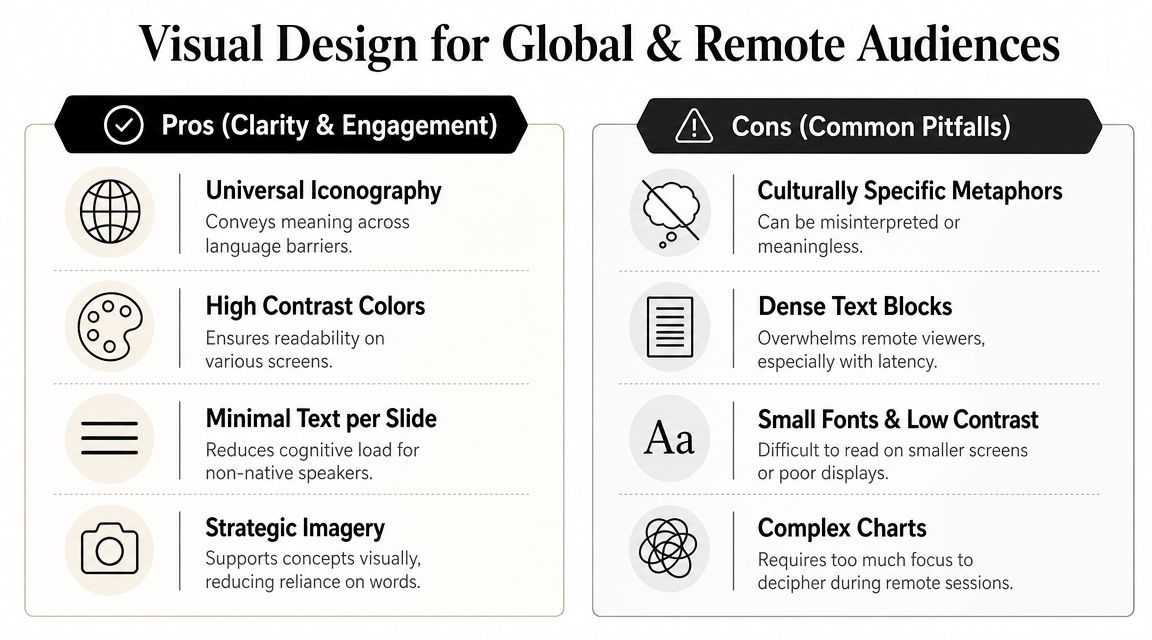
An influencing skills training ppt should demonstrate influence in its own design. If the slides are dense, culturally narrow, or hard to process on screen, the deck undermines the lesson.
This matters more in hybrid and remote work. Existing influence content often doesn't address modern distributed work well enough, even though virtual communication now carries more weight. One summary of the current conditions notes that Microsoft's 2024 Work Trend Index found 75% of knowledge workers use AI at work, increasing the premium on concise written and virtual communication in workplaces with fewer live interactions (discussion referencing influencing skills PPT and Microsoft Work Trend Index).
Design for comprehension first
If your audience includes global professionals, accessibility-first design isn't optional. It's part of the teaching method.
Use these principles:
- One point per slide: If a slide contains two ideas, split it.
- Short English: Prefer direct verbs and short sentences.
- Large type: Small text punishes remote viewers and non-native readers first.
- High contrast: Dark text on a light background is usually the safest choice.
- Predictable layout: People process structure faster when each slide behaves similarly.
Remove what doesn't travel across cultures
Many trainers add visuals that look complex but create friction. Idioms, sports metaphors, sarcastic cartoons, and culture-specific humor often confuse international groups or dilute the point.
A cleaner standard works better:
| Use more of this | Use less of this |
|---|---|
| Simple icons | Decorative stock scenes |
| Message diagrams | Busy process maps |
| Plain-English headlines | Clever but vague titles |
| Short examples | Long explanatory paragraphs |
Design principle: If a participant has to decode the slide, they stop listening to the speaker.
Accessibility also includes what screen readers and documentation systems can interpret. If your slides will be shared afterward, adding alt text to key visuals is worth the extra effort. A practical tool for drafting descriptions quickly is this alt text generator, which can help teams make training assets easier to use across formats.
Remote audiences need visual restraint
On video calls, attention drops whenever slides ask too much. Complex charts, tiny labels, and long animations don't create authority. They create delay.
For international professionals presenting remotely, vocal and visual clarity reinforce each other. If participants tend to sound less crisp on calls than they do in person, this guide on speaking English more clearly on video calls and presentations is a relevant complement to deck design because the slide and the spoken delivery have to work as one system.
Crafting Speaker Notes That Add Real Value
Slides carry the structure. Speaker notes carry the judgment.
Weak notes repeat what's already visible. Strong notes tell the facilitator what to emphasize, where to pause, what question to ask, and what misconception to surface. They also help less experienced facilitators avoid turning a practical session into a lecture.
Build notes around decisions and prompts
For each slide, I'd include four things:
- The core takeaway
- The facilitation cue
- The example or story
- The transition line
That creates enough support without scripting the presenter into stiffness.
For example, if the slide introduces the distinction between influence and persuasion, the note should clarify that training materials commonly define influence as long-term effect without force, while persuasion is more about short-term agreement. That distinction matters because many participants push for immediate compliance when they need trust, buy-in, and sustained alignment. The same training materials emphasize techniques like empathy, active listening, and understanding what others need, which reflects a collaborative leadership model rather than command-and-control (Symonds Research influencing skills overview).
Put depth in the notes, not on the slide
Expertise belongs here. Keep the slide simple. Put nuance below it.
A practical speaker note might say:
Ask the group where they confuse being right with being influential. Pause after the question. If nobody answers quickly, offer an example of a technically correct message that failed because it ignored stakeholder priorities.
That kind of note makes the deck teachable.
Another useful note is a language adaptation cue for international groups. For example: “If participants hesitate, offer a shorter phrasing option.” That one line can rescue a roleplay.
There's also a place for targeted coaching support beyond the workshop itself. Intonetic offers The Gravitas Method, a 12-week one-on-one executive presence coaching program for international professionals who want to communicate with more authority and influence at senior levels. The program is priced at $8,200 paid in full or $9,000 across three installments. Coached by Nikola, it covers vocal authority, strategic framing, executive body language, and high-stakes communication.
Notes should protect pacing
Speaker notes are also where you prevent the biggest facilitation mistake: talking too much.
Add cues such as:
- Pause here for reflection
- Move to pairs after two responses
- Cut the example if discussion is rich
- Don't answer your own question too fast
Those instructions make the session feel live instead of over-controlled.
From Slides to Skills Your Next Step
A strong influencing skills training ppt doesn't try to impress people with how much it knows. It gives them a structure they can use under pressure. It creates practice, surfaces habits, and helps people leave with one or two moves they can apply in real conversations.
That shift matters. The deck stops being a content asset and starts acting like a coaching tool.
For senior and international audiences, that means being stricter about relevance, cleaner in design, and more deliberate about practice. It also means accepting a trade-off that many trainers avoid. You can either cover more material or create more behavior change. You usually can't do both in the same session.
If you're building one of these workshops internally, keep your standard simple. Every slide should earn its place. Every activity should produce observable behavior. Every debrief should help participants understand not just what to say, but how they're coming across when they say it.
And if you're working on your own executive communication, treat progress the same way you'd treat any serious leadership capability. Track it. Review it. Refine it against real situations. This guide on how to track your accent coaching progress is useful because communication improvement sticks better when you measure patterns instead of relying on vague impressions.
The fastest way to improve influence isn't making prettier slides. It's designing better practice around the moments that usually go wrong.
If you want a clearer read on how you currently come across in senior conversations, start with Intonetic's free Executive Communication Assessment. It's a practical first step for identifying gaps in clarity, vocal authority, strategic framing, and executive presence before you decide what to work on next.