
How to Present to Senior Executives & Win Them Over
You’re in the final minutes before a leadership meeting. Your deck is polished. Your analysis is solid. You know the topic better than anyone in the room.
Then the meeting starts, and everything shifts.
The CFO interrupts on slide two. The regional leader joins remotely with camera off. A board member asks for the recommendation before you’ve finished your background. Someone says, “What exactly do you need from us today?” If you’re an international professional, there’s often a second layer of pressure: you’re not only presenting the work, you’re also managing accent bias, reading the room across cultures, and trying to sound decisive in a language that may not be your first.
That’s where most executive presentations break down. Not because the presenter lacks expertise, but because they prepare for an information session when the room expects a decision conversation. If that dynamic feels familiar, you’ll want to understand how accent bias affects workplace perception for non-native speakers, because it often shapes how authority is interpreted before you’ve even reached your main point.
Why Most Presentations Fail Before They Begin
A senior team logs into a hybrid review. Two executives are in the room, three are remote, one joins late from Singapore, and another keeps the camera off while listening from an airport lounge. The presenter starts with background slides. Within minutes, attention fragments. The in-room leaders begin side glances. The remote leader interrupts for the recommendation. The presenter is still setting up the story.

That failure starts before slide one. It starts with a false assumption about what senior executives want from the meeting.
Senior leaders rarely want a full download. They want a fast read on judgment. McKinsey senior partners have argued that top executives value concise communication that gets to the point quickly, especially when the discussion is tied to decisions, risk, and resource trade-offs (McKinsey on communicating with the CEO). In practice, that means your opening minute carries more weight than the detail buried on slide twelve.
The problem gets sharper in virtual and hybrid settings. In person, you can recover with eye contact, room energy, and informal cues. On video, delay, muted reactions, small screens, and divided attention make weak framing show up faster. A long runway feels longer online. A careful, indirect opening can sound uncertain when the audio is flat and the audience is half-reading email.
I see this often with strong technical and cross-functional leaders. They prepare thoroughly, then present in the sequence that felt responsible during the analysis phase. Method first. Context second. Recommendation last. That order may be logical, but it asks executives to wait for the point, and senior leaders are not patient listeners when they are carrying ten other priorities.
Expertise is not the same as executive communication
Expertise answers the question correctly. Executive communication answers the question the room is already asking.
Those are different skills.
In executive settings, heavy detail at the start often signals weak prioritization. The issue is not that the material is wrong. The issue is that the presenter has not filtered it for the level of decision being made. Senior leaders usually judge your message through business consequence, timing, risk exposure, and confidence under pressure.
That is why a presentation to senior executives often shapes how people assess readiness for bigger roles. The audience is listening for content, but they are also watching for judgment, presence, and adaptability.
What executives hear, especially across screens
A few common openings illustrate the gap:
| Approach | How executives often hear it |
|---|---|
| “Let me give some background before I get to the recommendation.” | “You have not prioritized this for me.” |
| “I’ll walk through the analysis step by step.” | “You may know the work, but I’m not yet hearing a point of view.” |
| “My recommendation is option B. It costs more upfront, reduces execution risk, and gets us to market faster.” | “Good. Now we can discuss the trade-offs.” |
In hybrid meetings, delivery affects interpretation even more than many presenters realize. If you look only at the screen instead of the camera, remote executives experience less direct connection. If your face is dimly lit, your expression becomes harder to read. If you pause too long after a challenge, a direct culture may read that as uncertainty, while a more consensus-oriented culture may see it as thoughtful restraint. Neither interpretation is universally right. Both affect authority in the moment.
The hidden mismatch for international professionals
For international professionals, this is often a communication issue and a cultural one at the same time. In some business cultures, respect means building context carefully, showing the logic, and avoiding strong claims before senior people have spoken. In many executive teams in the US, UK, and parts of northern Europe, the expected signal is different. Clear recommendation first. Supporting logic second. Discussion early.
Virtual meetings make that mismatch harder to manage. You have fewer cues, fewer chances to repair an impression, and less room for nuance in tone. If English is not your first language, or if you are already managing how accent bias shapes workplace credibility for non-native speakers, a context-heavy opening can be judged more harshly than the same opening from a familiar insider.
The goal is not to copy one culture’s style without judgment. The goal is range. Strong presenters know when to be concise, when to add context, when to state a recommendation with force, and when to soften the wording to keep alignment across regions and functions. That adjustment is part of executive presence now, especially on screen.
Strategic Framing The Mindset Before the Message
Most presentation problems start before PowerPoint opens. They start when the presenter hasn’t decided what the room must leave with.

Executives don’t reward volume. They reward relevance. The Humphrey Group notes that effective presentations to senior executives hinge on one clear message backed by selective evidence, and that strong presenters lead with the key idea upfront to create dialogue rather than deliver a monologue (Humphrey Group on why executive presentations follow different rules).
Start with the decision, not the topic
Don’t begin with, “I’m presenting our customer retention analysis.”
Begin with the business outcome:
- Approval ask: “I’m recommending we prioritize the enterprise segment this quarter.”
- Alignment ask: “I need agreement on which market we enter first.”
- Risk ask: “I want to flag the operational risk in the current rollout and propose a correction.”
That shift matters because executives think in decisions, trade-offs, and consequences. Topic-based framing sounds informational. Decision-based framing sounds strategic.
Find your one thing
Before writing slides, answer this question in one sentence:
What’s the one thing this room should remember if they forget everything else?
If you can’t answer that cleanly, your audience won’t be able to repeat your message after the meeting.
A strong “one thing” has three parts:
-
A point of view
Not “we reviewed the options.” Instead: “Option B is the strongest path.” -
A business reason
Tie it to revenue, cost, speed, risk, customer impact, or execution feasibility. -
A directional ask
Clarify whether you want approval, input, or permission to proceed.
A weak version sounds like this: “Today I’ll cover the project status and several findings.”
A stronger version sounds like this: “I recommend delaying launch until the integration issue is fixed because the current path increases delivery risk.”
Read the executive agenda before you craft the message
If you don’t know what matters to the room, even a polished message can miss. Strategic framing starts with audience intelligence.
Ask yourself:
- What are they measured on? Growth, margin, risk control, speed, market share?
- What pressure are they under right now? Integration, investor expectations, operational instability, hiring?
- What has changed recently? Leadership shifts, reorganizations, budget scrutiny, product delays?
- What role will they play in the meeting? Decision-maker, sponsor, skeptic, observer?
Many ambitious professionals underprepare. They study their content but not their audience.
Practical rule: never present the same deck to a CFO, a product executive, and a regional GM without changing the framing. The same idea lands differently depending on what each leader protects.
If you want help diagnosing how your communication lands in senior settings, Intonetic offers an Executive Communication Assessment for leadership-facing professionals. Used well, an assessment like this helps surface whether your issue is structure, delivery, authority, or audience adaptation.
Translate expertise into executive language
Technical experts often lose executive attention when they lead with features, process steps, or methodology. The fix isn’t to become simplistic. It’s to translate your work into consequences executives care about.
A useful conversion table:
| Technical framing | Executive framing |
|---|---|
| “We need to refactor the system architecture.” | “The current setup increases delivery risk and slows scale.” |
| “The model precision improved.” | “This improves decision quality and reduces exposure to avoidable errors.” |
| “The process has too many manual handoffs.” | “We’re carrying unnecessary operational risk and delay.” |
Notice what changed. The substance didn’t get weaker. It got more legible at a senior level.
A short example can help:
- Peer-level version: “We tested four implementation options and benchmarked system dependencies.”
- Executive version: “We have two viable paths. One is faster but raises execution risk. The other is slower upfront but easier to scale.”
The second version gives leaders something they can act on.
A quick example of concise framing in practice is worth watching here:
What strategic framing sounds like in the room
When framing is strong, you sound like someone who belongs at the table:
- “My recommendation is X because Y.”
- “There are two trade-offs. Here’s the one I believe matters most.”
- “If we do nothing, the main consequence is delay and increased risk.”
- “The decision I need today is limited. I’m not asking for full approval yet.”
That language does two things at once. It reduces cognitive load, and it signals judgment.
Designing the Executive-Ready Deck The 10/90 Rule
Most executive decks are overloaded because the presenter is trying to solve two problems with one document. They want slides that can be presented live, and they want slides that can survive detailed scrutiny afterward.
Those are different jobs.
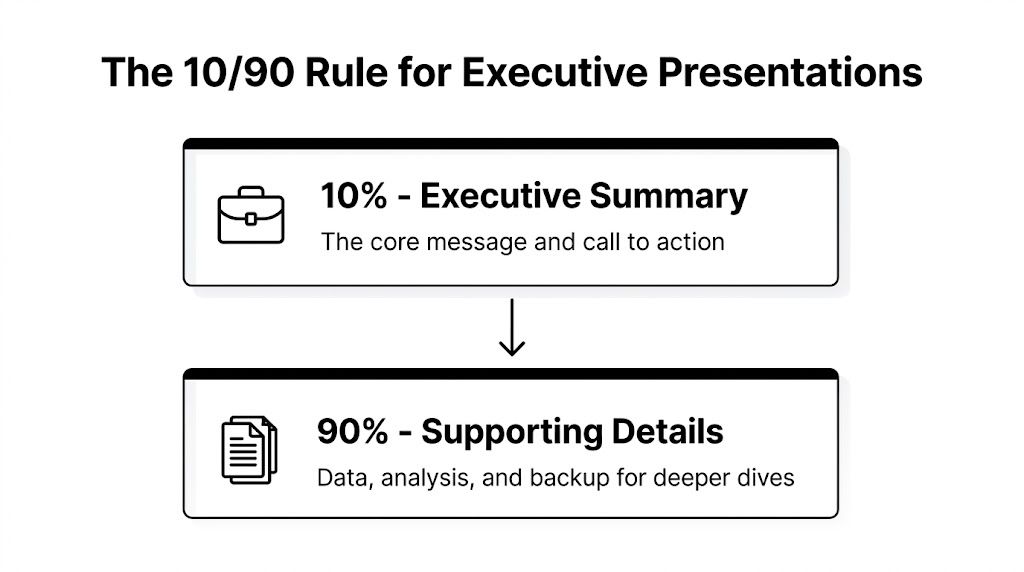
The cleanest way to resolve that tension is the 10/90 rule. Duarte recommends that your summary slides make up 10% of the total deck, while the remaining 90% sits in the appendix. In a 50-slide deck, that means 5 summary slides and 45 backup slides (Duarte on how to present effectively to senior executives).
Build two decks inside one file
Think of your file as having two layers.
The first layer is what you present. It contains:
- The headline recommendation
- The business rationale
- The critical trade-offs
- The ask
- The next step
The second layer is your backup system. It contains:
- Data tables
- Methodology
- Financial logic
- Scenario analysis
- Implementation details
This structure changes your behavior. You stop dragging executives through every analysis step. Instead, you give them the conclusion first and keep proof ready for scrutiny.
What the first few slides should do
An executive-ready summary deck usually needs only a handful of slides. Their job isn’t to impress. Their job is to orient fast.
A practical sequence:
-
Opening recommendation
State the point of view in the title. Not “Market Review.” Use “Enter Market B first.” -
Why this option wins
Show the few reasons that matter most. -
Trade-offs and risks
Don’t hide them. Executives trust presenters who surface constraints early. -
Specific ask
Clarify the decision needed today. -
Next step
Show what happens after approval or alignment.
A good executive slide can often be understood in seconds without narration.
That matters because many senior leaders are scanning ahead while you speak. If your slide title is vague, you lose control of the story.
Design for scanning, not decoration
A common mistake is making slides “professional” by adding more design elements. In executive settings, visual clutter lowers clarity.
Use these filters:
- Headlines should make claims. “Churn risk rising in mid-market accounts” is stronger than “Customer retention trends.”
- One slide, one message. If the slide contains three ideas, it needs rewriting.
- Numbers belong where they answer a decision question. If a metric doesn’t change the recommendation, move it to backup.
- Charts must reveal the point immediately. If the audience needs thirty seconds to decode the chart, it’s too complex for the summary section.
If you need to include detailed spreadsheets or supporting tables in the appendix, a technical guide like Elyx AI’s walkthrough on how to insert an Excel spreadsheet into PowerPoint can be useful for keeping source material accessible without crowding the main presentation.
The deck should support conversation, not replace it
Presenters often hide behind slides when they feel nervous. The result is a narrated document instead of a leadership conversation.
A stronger rhythm looks like this:
| Weak delivery pattern | Executive-ready pattern |
|---|---|
| Read every bullet | State the conclusion, then elaborate briefly |
| Explain every chart | Show only the chart that changes the decision |
| Save questions for the end | Invite discussion once the summary is clear |
| Treat appendix as optional clutter | Use appendix as proof on demand |
This is one of the most practical answers to how to present to senior executives. Don’t try to show everything. Show that you know what matters most, and be ready when they ask for more.
Commanding the Room Delivery and Executive Presence
The meeting starts at 7:00 a.m. New York time. Singapore is dialing in late. Two executives are in the boardroom, three are on screen, and one joins without video. You have ten minutes to make a recommendation. In that setup, delivery is part of the decision.
A strong analysis still loses force if your presence suggests hesitation, poor control, or weak cultural judgment. Senior leaders assess all three at once: the idea, the person presenting it, and whether that person can hold the room under pressure.

Authority shows up before your second slide
Executives form an impression fast. They notice whether you begin cleanly, whether your face tightens when challenged, whether you rush through key lines, and whether your body looks settled or scattered.
Virtual and hybrid formats amplify this. On camera, a drifting eye line, delayed audio response, or nervous smile reads louder than it would in a physical room. In person, you can recover some presence through proximity and room energy. Online, the frame strips that away. What remains is your voice, face, timing, and control.
Authority weakens quickly when you:
- fidget after stating a recommendation
- look down at notes while answering
- speak at one speed from start to finish
- talk over interruptions
- appear poorly framed, dimly lit, or visually distracted on camera
Authority strengthens when you:
- go still before the key sentence
- look into the camera when stating the decision
- pause after the conclusion instead of before it
- acknowledge interruptions calmly
- keep your expression neutral and composed under challenge
The room trusts what it sees.
Use your voice with operational control
Many technically strong professionals speed up as the stakes rise. They are trying to sound fluent. Senior executives usually hear something else: uncertainty, over-explaining, or a lack of command over the recommendation.
A stronger vocal pattern is plain and disciplined.
Slow the rate at the exact right moment
Do not try to sound impressive. Sound settled.
Compare these two versions:
- “So we reviewed three possible approaches and I think the second one is probably the best because it gives us more flexibility.”
- “I recommend option two. It preserves flexibility and keeps execution risk lower.”
The second version gives the room something they can assess. It also sounds more senior because the judgment is clear before the explanation begins.
Pause after the conclusion
Less experienced presenters pause while searching for words. Strong presenters finish the sentence, then leave space for the point to register.
That pause matters more in global meetings, where some participants are processing your English, your accent, and the business implications at the same time. If pronunciation affects clarity under pressure, focused work on English pronunciation for public speaking can reduce rushing, clipped endings, and visible self-correction.
Remove softeners that blur judgment
Politeness is useful. Vagueness is expensive.
Phrases like “just,” “kind of,” “maybe,” and repeated “I think” often make a recommendation sound less tested than it is. Keep the tone respectful, but state the view cleanly. “My recommendation is…” works better than “I was kind of thinking that maybe…”
Boardroom presence and camera presence are different skills
A common mistake is using the same physical habits in every setting. That costs people credibility, especially in hybrid meetings where part of the audience sees a live speaker and part sees a cropped rectangle.
| In-person room | Virtual or hybrid room |
|---|---|
| Eye contact rotates across people | Eye contact means looking into the camera at decision points |
| Gestures can be broader | Gestures should stay inside the frame |
| Movement can add energy | Repeated movement looks unstable on screen |
| Presence comes from how you occupy the room | Presence comes from framing, facial control, and vocal steadiness |
In a physical boardroom, use grounded posture and economical movement. If you stand, plant your feet before your opening line. If you sit, avoid collapsing into the chair after a question. Small posture drops can make your confidence look conditional.
On camera, setup is part of delivery. Raise the laptop or use an external camera at eye level. Light your face from the front. Clear the background. Check what your hands are doing in frame. I have seen excellent presenters lose authority because the camera angle made them look like they were speaking upward from a kitchen table.
Cultural nuance matters more in senior meetings than many guides admit
International professionals often hear generic advice: be more concise, be more assertive, be more confident. That misses the actual challenge. Executive presence is not a single style. It is the ability to stay credible while adjusting to the expectations of the people in front of you.
In one company, direct disagreement with the CFO is taken as mature business judgment. In another, the same wording sounds abrupt unless you signal alignment first. Some executives expect quick eye contact and concise challenge. Others respond better when disagreement is framed with context and respect for hierarchy.
The practical goal is not imitation. It is controlled adaptation.
Use this approach:
- keep the recommendation direct
- adjust the lead-in based on the culture of the company
- challenge ideas with the right level of force for that room
- watch how senior leaders in that organization signal disagreement, urgency, and consensus
- match the business rhythm without losing your own clarity
This matters even more in hybrid meetings across regions. A pause that reads as thoughtful in one culture may be read as uncertainty in another. A direct camera gaze may project confidence to one executive and feel too intense to another. Good presenters notice these differences early and adjust without becoming stiff or overly self-conscious.
One useful way to build that control is to study adjacent pressure situations. The habits that help candidates answer difficult interview questions like a pro also help in executive meetings: concise structure, emotional control, and the ability to respond without sounding defensive.
For professionals who want structured support, Intonetic offers coaching on vocal authority, executive body language, strategic framing, and high-stakes communication for senior audiences.
Mastering the Q&A and Handling Tough Questions
The Q&A is where many presentations are decided. A polished opening creates momentum. Your answers determine whether the room trusts your thinking.
The biggest mistake is treating questions as interruptions to your performance. In executive meetings, questions often are the actual meeting.
Why tough questions are usually a good sign
When executives interrupt, they’re often doing one of three things:
- testing your judgment
- checking risk
- seeing how you think under pressure
That means a hard question is not automatically a bad sign. Silence can be worse. Silence may mean the room has disengaged.
A useful mental shift is to treat Q&A as a working session. You’re no longer “delivering.” You’re helping leaders make a decision with incomplete time and incomplete certainty.
Use PREP when the room gets sharp
The PREP model helps you answer concisely under pressure. The referenced guidance on executive presentations pairs this kind of structured response with strategic outcome framing and notes that the desired outcome should be stated within the first 60 seconds, because executives want analytical proof and operate from a “10,000-foot view” (PowerSpeaking on executive presentation tips).
PREP stands for:
- Point
- Reason
- Example
- Point again
Here’s how it sounds in practice.
Question: “Why shouldn’t we approve this now?”
Weak answer:
“Well, there are a few things we’re still looking at, and the team has been reviewing the implementation dependencies, and I’d say there are still some concerns.”
PREP answer:
Point: “I recommend waiting.”
Reason: “The implementation risk is still too high.”
Example: “The handoff between teams isn’t stable enough for a clean rollout.”
Point: “Approving today would create avoidable execution risk.”
That format works because it stops you from wandering.
Response test: if your answer takes so long that the executive forgets the original question, you’ve lost control of the exchange.
Handling the questions presenters fear most
Some questions are difficult because they challenge the work. Others are difficult because they challenge you.
Try these patterns.
When you don’t know
Don’t bluff. Executives can usually tell.
Use: “I don’t have that number with me. I’d rather verify it than guess. I can send a precise follow-up today.”
That answer protects credibility because it shows discipline.
When the question is hostile
Don’t mirror the tone. Slow down instead.
Use: “There are two parts to that. The short answer is yes, there is risk. The relevant question is whether the return justifies it, and here’s my view.”
The key is not becoming defensive. Defensiveness reads as fragility.
When someone pulls you off topic
Acknowledge the point, then reconnect it.
Use: “That’s important. The way it affects today’s decision is this.”
That sentence is small, but it keeps the room centered.
If you want extra practice thinking on your feet, some of the same techniques used to answer difficult interview questions like a pro also help with executive Q&A because both situations test composure, structure, and judgment under pressure.
Prepare for Q&A like a strategist, not a student
It's common practice to rehearse slides and improvise answers. Reverse that.
Create three lists before the meeting:
- Questions you hope they ask
- Questions you fear they’ll ask
- Questions they should ask but may not
Then prepare short responses. Not scripts. Responses.
For board-level or leadership-facing meetings, focused rehearsal on pronunciation and boardroom delivery for executives can also be useful if your main risk is losing clarity when you’re challenged unexpectedly.
Your Rehearsal Framework and Pre-Presentation Checklist
At 7:58 a.m., the CFO joins from London, the CEO is in Singapore, and two board members dial in with cameras off. Your slides are open. Your mic works. Then the first 30 seconds go wrong. You look at the deck instead of the camera, speak too fast, and use an opening sentence that takes too long to reach the point.
That kind of miss is common in executive meetings, especially in virtual and hybrid settings. The content may be right, but the signal you send through pace, eye line, silence, posture, and turn-taking shapes how senior leaders judge your readiness.
Rehearsal is how you reduce that risk.
Senior executives rarely want a guided tour of every slide. They want a clear recommendation, enough evidence to trust it, and room to test your judgment. Your practice should reflect that reality. If you have a 20-minute slot, prepare for a short presentation and a serious discussion, not a 20-minute monologue.
Rehearse the first minute until it is clean
The opening sets your authority. In a global C-suite meeting, it also sets your accessibility. If some participants are joining in a second language, or dealing with unstable audio, your first minute must be easy to follow.
Practice four lines until you can deliver them without looking down:
- Your recommendation
- Why it makes business sense
- What decision you need
- How you want to use the meeting
A strong opening sounds like this:
“I recommend we phase the rollout rather than launch globally at once. It reduces execution risk while preserving momentum. I’m asking for approval on that approach today, then I’ll cover the trade-offs and open discussion.”
That opening gives the answer early and makes the decision clear.
Build recall, not recitation
Full memorization causes problems in executive settings because the meeting rarely follows your preferred order. A board member interrupts. The COO asks for the implication by region. Someone on video has a delay and asks you to repeat the recommendation. If your delivery depends on a script, your composure drops as soon as the sequence changes.
Know these cold:
- Your core argument
- Three supporting points
- The trade-offs
- Likely objections
- Your exact ask
Then practice in a way that matches real pressure:
- Explain the case without slides
- Deliver only the opening and closing
- Jump from the summary slide to backup slides
- Answer hard questions out loud
- Run the meeting with interruptions and time cuts
The fourth and fifth steps matter most because they test judgment, not memory.
Use a murder board with the right mix of people
A good murder board does more than challenge your analysis. It tests whether your message survives different personalities, functions, and communication styles.
Set it up on purpose:
- One person plays the skeptical CFO
- One person pushes execution risk
- One person asks for the recommendation again in simpler terms
- One person joins remotely and interrupts with short, blunt questions
- One person listens for language that may confuse an international audience
That last role gets missed too often. In global leadership meetings, idioms, soft qualifiers, and region-specific references can make a strong idea sound fuzzy. I often see capable professionals lose authority because they say something culturally familiar rather than operationally clear.
Ask reviewers questions that produce useful feedback:
- What decision was I asking for?
- Where did my answer get too long?
- What sounded uncertain even though the analysis was solid?
- Which phrase would confuse a leader outside my home market?
- Did I look engaged on camera when I paused to think?
If the room cannot repeat your recommendation in one sentence, keep refining.
Rehearse delivery on video, not only in your head
Slide review is not rehearsal. Silent click-throughs do not prepare your face, voice, breathing, or physical control.
Record yourself. Then review in two passes.
First, watch with the sound off. Check posture, eye line, facial tension, and whether you look at the camera when stating the recommendation. In hybrid meetings, this matters more than many presenters expect. Looking down at notes can read as uncertainty. Looking at the camera during key lines reads as directness.
Second, listen without watching. Check pace, clipped endings, filler words, and whether your pauses sound deliberate or anxious.
For international professionals, this step is especially useful because stress changes pronunciation, rhythm, and sentence endings. Structured rehearsal such as role-playing and simulation exercises for spoken English improvement can help you stay flexible and clear when the conversation stops following your plan.
The day-before check
Executive presentations usually break down through a series of small misses. The file name is wrong. The appendix is hard to reach. The opening is still vague. The camera angle is too low. None of these issues is dramatic on its own. Together, they weaken trust.
Run this check the day before:
| Check area | What to confirm |
|---|---|
| Message | Can you state the recommendation in one sentence? |
| Ask | Is the decision needed from the room explicit? |
| Deck | Are the summary slides clean and the appendix easy to access? |
| Evidence | Do you know which backup slide answers each likely challenge? |
| Delivery | Have you practiced the opening aloud several times? |
| Audience | Do you know who is likely to support, question, or resist the proposal? |
| Technology | For hybrid meetings, have you tested camera, sound, screen share, lighting, and eye-line placement? |
| Global audience | Have you removed idioms, dense acronyms, and humor that may not travel well? |
The day-of checklist
Keep the routine tight.
- Join early enough to settle your pace
- Open the appendix before the meeting starts
- Put water within reach
- Turn off notifications
- Place notes near the camera, not off to the side
- Check what your hands and shoulders are doing on screen
- Decide your first sentence before anyone joins
If the meeting is hybrid, also decide who you are speaking to at each moment. One common mistake is presenting only to the people in the physical room while remote executives become passive observers. Pause long enough for remote participants to enter. Look into the camera when answering a decision question. If a senior leader on video speaks, respond as if they are the primary audience, not a secondary feed.
What confidence looks like in rehearsal
Confidence comes from repeatable behaviors under pressure. You can hear it in a measured answer. You can see it in a pause before a difficult response. You can feel it when a presenter stays steady after being interrupted.
It looks like:
- starting with the decision
- holding eye contact with the camera at key moments
- pausing without apologizing
- naming risk without sounding alarmed
- switching to backup material without fumbling
- speaking in language a global leadership team can process quickly
That is the standard to practice for. Senior leaders do not need perfection. They need clarity, judgment, and control they can trust.
If you want a clearer view of how your communication currently lands with senior stakeholders, start with Intonetic’s free Executive Communication Assessment. It’s a practical first step if you want to identify where your structure, delivery, executive presence, or virtual communication may be weakening your authority, and build a focused plan to improve it.